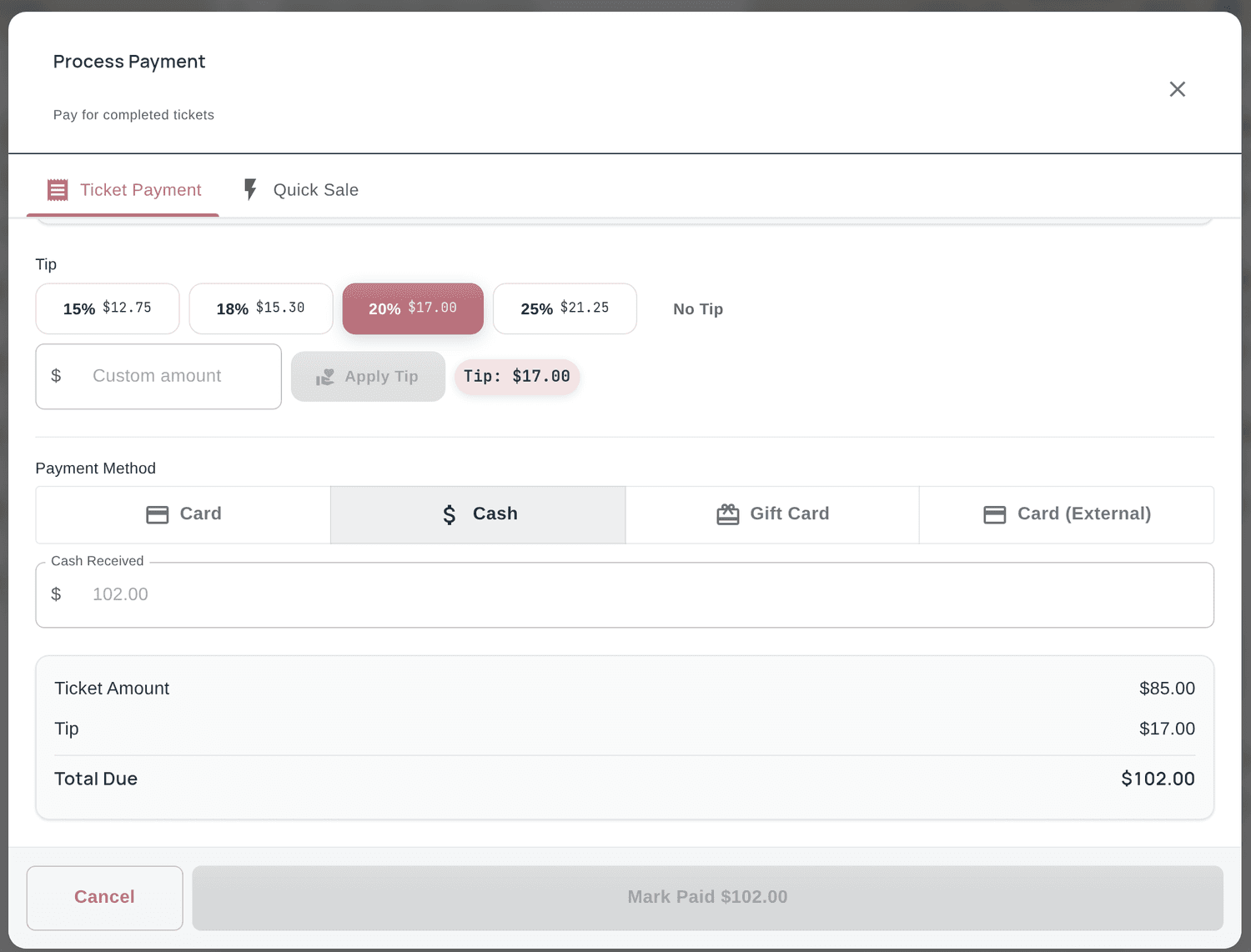
Increase Salon Tips by 15-30%
How this feature helps your salon succeed
Higher Tips
Smart tip suggestions increase average gratuity by 15-30% compared to manual tipping.
Beautiful Display
A polished, touch-friendly tip screen that clients enjoy using during checkout.
Custom Presets
Set your own suggested percentages and amounts to match your salon's service level.
Tip Analytics
Track tip trends by technician, time of day, and service type to understand tipping patterns.
Tip Suggestion Features & Analytics
Our smart tip suggestions for salons feature includes everything you need to manage this aspect of your salon efficiently.
- Customizable preset percentages (e.g., 18%, 20%, 25%)
- Dollar amount display alongside percentages
- Custom tip amount entry option
- Touch-friendly kiosk display mode
- No-tip skip option for flexibility
- Per-technician tip tracking and reports
- Tip trend analytics over time
- Seamless integration with POS checkout flow
Smart Tip Suggestions for Salons Screenshot
Tip Suggestions in Action
See how salons use this feature every day
Client Checkout
After service totals are calculated, the tip screen presents beautiful preset options that make generous tipping the easy choice.
Technician Earnings
Track how each technician's tips compare over time and see which services generate the highest gratuity.
Group Appointments
Handle tip suggestions for multi-service group bookings where clients may tip different technicians.
How do tip suggestion screens increase gratuity for nail salons?
Tip suggestion screens increase gratuity at nail salons by presenting clients with pre-calculated tip options during checkout. When clients see suggested percentages like 18%, 20%, and 25% alongside the corresponding dollar amounts, they are more likely to tip generously than when entering a number from scratch. Studies show digital tip prompts increase average gratuity by 15-30% compared to manual tipping. The touch-friendly kiosk display makes selection easy and fast. Salon owners can customize the preset percentages and include a custom amount option. Tip analytics help track trends and measure the impact over time.
Which Salon Software Has Built-In Tipping?
Almost all of it, in the narrow sense that a client can add a tip at checkout. That is not the useful question. What separates one system from another is where the tip goes after it is entered — whether it lands on the right technician, survives a split service, and reaches the right line of a payroll export without anyone rekeying it.
Accepting a tip and handling a tip are different features
A card terminal that shows three percentages accepts tips. Handling them means assigning the money to whoever earned it, dividing it when two people worked on the same client, holding it against that technician's payout, and reporting it accurately at the end of the week. A system can do the first perfectly and none of the rest, which is how salons end up reconciling tips in a spreadsheet anyway.
The screen decides the amount
Tip amounts are set far more by what the screen offers than by what the service was worth. Presets anchor the decision: a client shown 18, 20 and 25 per cent chooses differently from one shown 10, 15 and 20, and one handed a blank field usually rounds down. That is the single easiest thing to change in a salon, and it costs nothing.
Percentages and flat amounts suit different price points
Percentage presets work well on higher-value services. On a fifteen-dollar service they produce awkward, ungenerous numbers, and clients often tip less than they would have picked themselves. Flat-amount presets tend to do better on quick, low-ticket work. If your menu spans both, you want a system that can show a different set depending on the ticket total.
Split services are where most systems fall down
When a client has a service with one technician and a second with another, the tip has to divide somehow — evenly, by service value, or by whatever your salon has agreed. A system that assigns the whole tip to whoever happened to close the ticket creates a quiet unfairness that technicians notice long before the owner does.
Cash tips still have to be recorded
Cash does not disappear as a problem just because it never touches the card reader. It still has to be declared, still affects payroll, and still belongs in the technician's earnings total. Recording cash tips at the point they are given, rather than reconstructing them at the end of the week, is the only version of this that stays accurate.
What to check before you choose
Ask whether the presets can be changed by you rather than by support, whether they can differ by ticket size, how the system splits a tip across two technicians, whether cash tips can be entered alongside card tips, whether a technician can see their own tips without asking the front desk, and whether tips come out in a payroll export rather than a report someone retypes. Those six answers tell you more than any feature list.
Frequently Asked Questions About Smart Tip Suggestions for Salons
Common questions salon and barbershop owners ask about this feature
Studies show digital tip suggestion screens can increase average gratuity by 15-30% compared to manual tipping. When clients see pre-calculated tip amounts like 18%, 20%, and 25% alongside the corresponding dollar values, they consistently tip more generously. The touch-friendly interface makes selection easy, and the suggested amounts anchor clients toward higher tip levels.
Salon owners can set custom preset percentages (e.g., 18%, 20%, 25%, or any values you choose) and the system automatically calculates the corresponding dollar amounts based on the service total. You can also allow a custom tip entry option and a skip button for no-tip transactions. The presets can be adjusted anytime from the settings dashboard.
Every tip is attributed to the technician who performed the service. Tilavon generates per-technician tip reports showing daily, weekly, and monthly totals with cash vs card separation. Tip trend analytics help identify patterns by time of day, day of week, and service type. This data is included in payout summaries and payroll exports.
When a client receives services from multiple technicians, Tilavon displays each technician's portion of the total and allows separate tip amounts for each. For group appointments, the tip screen handles multi-technician tipping smoothly. Tips can also be pooled according to configurable rules set by the salon owner.
Tilavon's smart tip suggestions display context-aware tip amounts on the client-facing checkout screen based on the service value. Pre-calculated options make it easy for clients to choose a tip amount without awkwardness, which typically increases both tip frequency and average tip amount.
Nail technicians can view their accumulated tips in real time through the Tilavon employee app. They can see individual tips per service, daily and weekly totals, and how tips are distributed when tip pooling is in effect.
Most salon point-of-sale software accepts a tip at checkout, so the more useful question is what it does with the tip afterwards. Look for four things: adjustable suggested amounts, an automatic split when two technicians work on one client, cash tips recorded alongside card tips, and tips that flow into a payroll export without rekeying. Tilavon does all four, and the settings are yours to change rather than something support has to configure for you.
There is no universal answer, but the presets matter more than the exact numbers. Clients anchor on what they are shown, so a salon offering 18, 20 and 25 per cent will generally see different results from one offering 10, 15 and 20. On lower-priced services, flat amounts usually read better than percentages. The practical approach is to pick a set, leave it alone for a month, and compare your average tip before and after.
The two common methods are an even split and a split weighted by the value of each service. Weighted is usually fairer when one service is much larger than the other. What matters most is that the rule is agreed in advance and applied by the system every time, rather than decided at the counter by whoever is closing the ticket.
They should. A tip screen on a card terminal only captures card tips, which leaves cash to be reconstructed later from memory. Tilavon lets cash tips be entered against the technician at checkout, so both kinds land in the same earnings total and the end-of-week payout does not depend on anyone remembering.
Related Features
Explore other features that work great with Smart Tip Suggestions for Salons